Amazon Eero Pro 7 review: should you buy it?
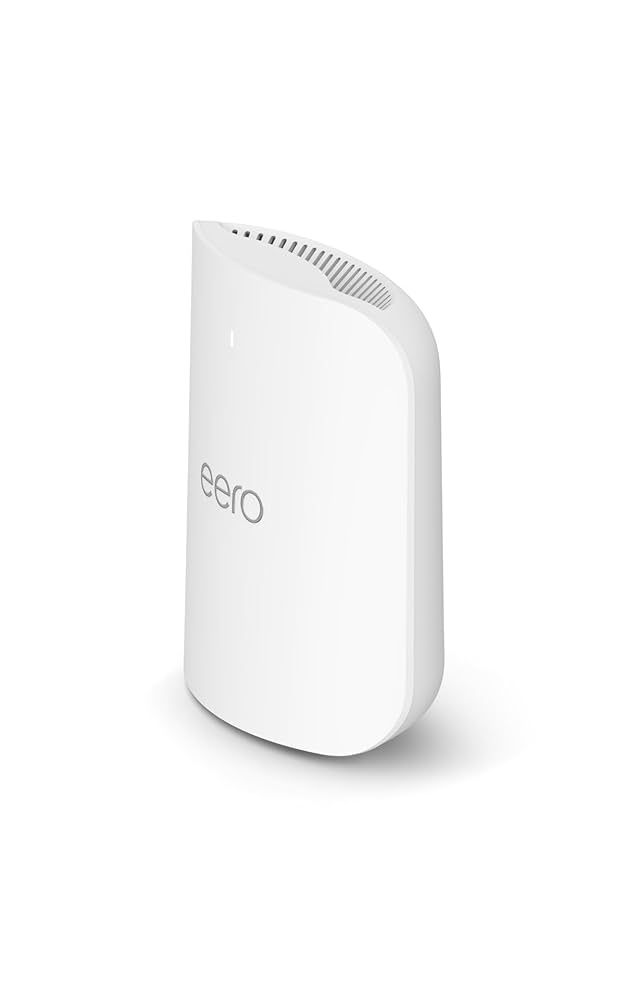
Product image · Source
Critics report strong, easy-to-manage Wi-Fi 7, but the subscription push is the catch.
What reviewers loved
- Strong whole-home coverage: PCMag reports a strong Wi-Fi signal reaching every corner of its test house.
- Straightforward setup and management: PCMag calls it easy to install and manage, while Engadget describes the app as tidy and well designed.
- Useful Wi-Fi 7 hardware: tri-band networking, 6GHz connectivity, 320MHz channel support and 5GbE Ethernet provide a modern foundation for fast devices and internet plans.
- Built for connected homes: native Thread, Matter and Zigbee support complements Amazon Alexa integration.
What held it back
- Several features sit behind a subscription paywall, a drawback highlighted by both PCMag and Engadget.
- Engadget reports that the app cannot assign traffic priority to important devices, limiting control during calls, streaming or other demanding tasks.
- The app does not clearly show network topology and can struggle to identify common connected products, according to Engadget.
- The three-piece system cost $699.99 as reviewed by PCMag, so its simplicity comes at a substantial upfront price.
Amazon Eero Pro 7 key specs
| Wireless standard | Wi-Fi 7 (802.11be) |
|---|---|
| Bands | Tri-band, including 6GHz |
| Channel support | Up to 320MHz |
| Ethernet | 5GbE Ethernet jacks |
| Rated coverage | 2,000 sq ft per node; up to 6,000 sq ft with three |
| Smart-home support | Thread, Matter, Zigbee and Amazon Alexa |
The short version
PCMag and Engadget both report strong wireless performance from the Eero Pro 7, while PCMag also praises its broad coverage and simple setup. It adds 6GHz Wi-Fi, 320MHz channels, 5GbE and useful smart-home standards. The honest trade-off is Eero's software model. Engadget strongly criticizes the subscription pressure, missing traffic-priority controls and limited network information, while PCMag also flags the paywall despite naming it an Editors' Choice.
What reviewers say about the Amazon Eero Pro 7
PCMag gives the Eero Pro 7 an Editors' Choice award for midrange Wi-Fi 7 mesh systems. It reports solid performance, simple installation and a strong signal throughout the house. The review also points to 6GHz connectivity, 320MHz channels, 5GbE and broad smart-home compatibility as meaningful upgrades over the entry-level Eero 7.
Engadget agrees that the wireless performance is strong and finds the app cleanly presented. Its verdict is much less forgiving about the software experience. The review says the app feels built around selling a subscription, lacks traffic-priority controls, does not explain the network's topology and sometimes fails to identify connected devices.
Best settings for the Amazon Eero Pro 7
the cited reviews do not provide special performance-tuning values. PCMag does document a few useful app checks for confirming that the mesh is working as intended. Read the full PCMag review.
| Run a connection check | Open the Internet tab in the Eero mobile app and run its speed test. |
|---|---|
| Check each node | Tap a node to view its IP address and see which clients are connected. |
| Verify client connections | Use the node view to check which Wi-Fi band each client is using and whether its connection is wired or wireless. |
Buy it if you want strong whole-home Wi-Fi 7 coverage, easy app-based management and built-in support for major smart-home standards.
Skip it if you want detailed network controls and security or management features without another subscription.
Also consider
Amazon Eero 7
PCMag positions it as the cheaper entry-level option at $349.99, but says the Pro 7 adds tri-band operation, 6GHz connectivity and 320MHz channel support.
Amazon Eero Max 7
The higher-end option in Eero's Wi-Fi 7 range. PCMag lists it at $1,359.99, making the Pro 7 the more attainable middle choice.
Should you buy the Amazon Eero Pro 7?
The Eero Pro 7 makes sense for a large or device-heavy home where dependable coverage and low-effort management matter more than advanced controls. Critics agree that its wireless hardware performs well, and PCMag found that it delivered a strong signal throughout the home. Smart-home support is another real advantage. But Engadget's criticism is important: the app withholds useful features behind a subscription while still lacking controls that demanding users may expect. Buy it for simplicity and coverage, not configurability.
See our best Smart Home picks.
How we build this review
We read 4 professional reviews from PCMag, Engadget, CNET, RTINGS. We don’t test units ourselves — we distill what critics agree on. Every claim is cited.
Sources
RightWei aggregates and summarizes independent reviews — we link to the original hands-on tests so you can go deeper. We don’t test units ourselves.
Re-checked July 2026